 VPC Atlas
One AWS account, several environments, and tags as the only map
How VPC Atlas draws and inventories one environment of a shared AWS account with its new tag filter, and what it leaves out.
When the account is the whole company
Plenty of teams don't split their AWS estate into accounts the way the reference diagrams do. I'm not arguing for it: one account per environment is the usual advice. This is for the accounts that exist. One account holds prod, staging and a sandbox, sometimes several teams as well. What tells them apart is a tag: Environment=prod, Team=payments. If the tagging is consistent, the tags are the only map of what belongs to what.
That's awkward for a tool that draws networks. VPC Atlas takes the account as its unit and draws what it finds, region by region. In a shared account that means prod next to staging next to the sandbox, on one page. The page gets big and says little, because your question was about prod and the answer is mixed in with the rest. VPC Atlas also writes one page per VPC, which is enough when every environment has its own. It isn't when two environments share a VPC, or when you want the region page, the inventory and the dashboard narrowed too.
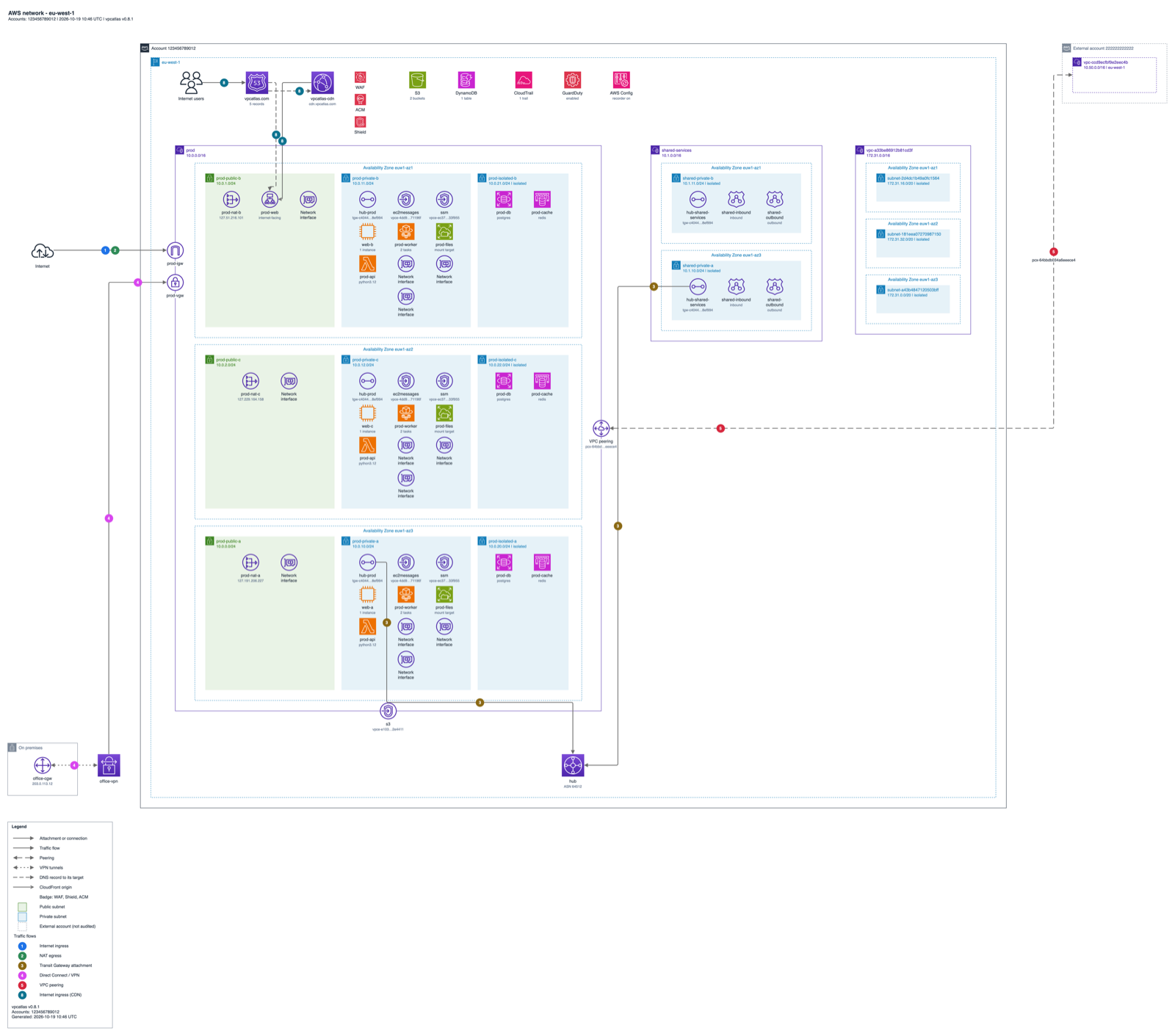
Version 0.8.0 adds --tag. It gives you the diagram and the inventory of one environment of a shared account, without moving a single resource. This post covers the option, two design decisions (one with a bug I found while making these figures), what disappears under the filter, and how it works with a saved graph and the dashboard. The part I'd read twice is the one about what disappears. You need 0.8.1 or later; the reason is in the story below.
The option
pipx install vpcatlas        # or: curl -fsSL https://vpcatlas.com/install.sh | sh
vpcatlas discover -r eu-west-1 --tag Environment=prod
--tag KEY=VALUE keeps the resources that carry that tag with that value. --tag KEY keeps the ones that carry the tag with any value. The option can be repeated, and then every rule must hold (an AND). In the value, * and ? are wildcards. Keys and values are compared exactly, case included, so environment=prod matches nothing in an account that spells it Environment=prod. The value is split at the first =.
Three shapes:
vpcatlas discover --tag Environment=prod --tag Team=payments
vpcatlas discover --tag 'Name=web-*'
vpcatlas discover --tag Owner
The first is one team inside one environment, the second a naming convention, the third everything that has an owner at all. The option works on discover, inventory, diagram and serve (docs). Services are excluded first, with --exclude-services (the existing option that leaves whole services out), and then the tag rules judge what stays.
What I measured
The figures come from the simulated account of the earlier posts, in eu-west-1, built with moto, the Python library that mocks AWS. The prod VPC (10.0.0.0/16) has nine subnets in three zones, NAT gateways, a load balancer, three single-instance groups, endpoints, EFS mount targets, an RDS instance, an ElastiCache cluster prod-cache, a Lambda prod-api and an ECS cluster prod with the service prod-worker. Next to it sit a shared-services VPC with Route 53 Resolver endpoints and a rule, a third VPC, a Transit Gateway hub, a VPN to an office, a peering to a VPC of another account, and the edge and account services (CloudFront, the hosted zone, the certificate, Shield, WAF, S3, DynamoDB, CloudTrail, Config, GuardDuty and so on).
Tags follow a convention: most prod resources carry Environment=prod, the shared ones Environment=shared. The ECS cluster prod and its service prod-worker, the web ACL, the hub, the VPN, the customer gateway of the office, the network interfaces, the network ACLs and the prefix lists carry no Environment tag.
vpcatlas discover -r eu-west-1 --output-dir vpcatlas-all finds 100 resources and 0 issues. Then, on the saved graph:
vpcatlas inventory --cache vpcatlas-all/vpcatlas-graph.json --tag Environment=prod --format csv --output-dir vpcatlas-prod
That writes 34 rows out of 100: 1 of 3 VPCs, 9 of 14 subnets, 5 of 9 route tables, 3 of 7 security groups, all 3 instance groups, the 3 NAT gateways, the 3 endpoints, and one each of load balancer, target group, RDS instance, EFS file system, internet gateway, virtual private gateway and peering.
The diagram comes from the same saved graph and the same rule:
vpcatlas diagram --cache vpcatlas-all/vpcatlas-graph.json --tag Environment=prod --output-dir vpcatlas-prod
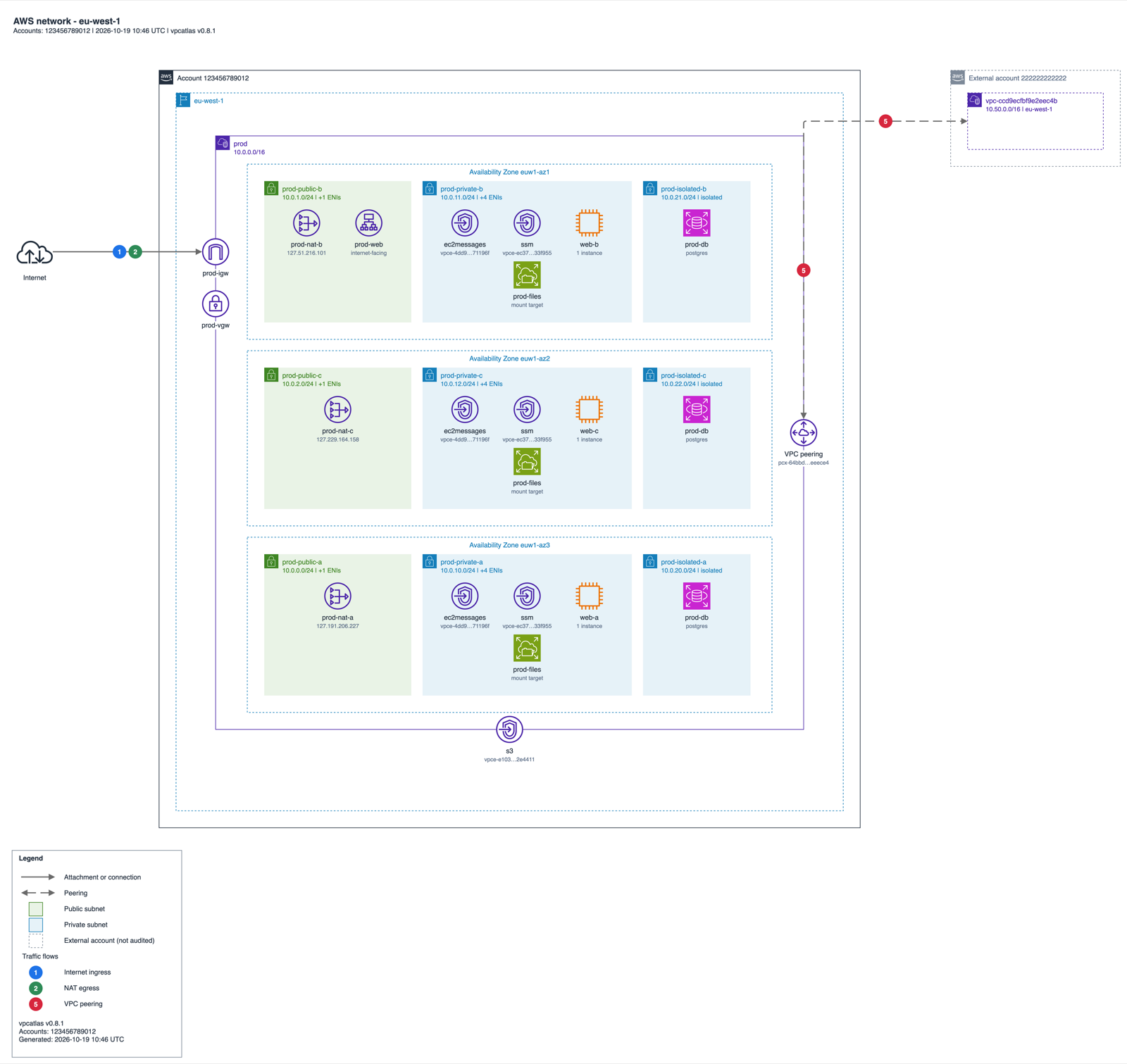
--tag Environment=prod: 34 of the 100 resources, every one tagged Environment=prod, plus the frame they hang from.The peering is there because it carries Environment=prod itself; the drawing hangs it from the prod VPC. The filtered run prints a warning, and I wanted it to: "Working from a partial graph: only resources matching Environment=prod are kept (--tag)."
Keeping the frame
The obvious way to filter is to throw away everything that doesn't match. A NAT gateway with no subnet, no VPC and no region has nowhere to sit, though, and can't be drawn. So a kept resource keeps its frame: its account, its region, and the VPC and subnets it hangs from. A subnet that matches brings its VPC along, tagged or not.
The other direction needed a decision too, and I chose the stricter one. A VPC that matches doesn't drag in its subnets or its workloads; they have to match on their own. If a VPC is tagged Environment=prod and one of its subnets Environment=staging, the staging subnet stays out of the prod diagram, unless something tagged prod sits in it: then it comes back as that resource's frame. I'd rather have a diagram that's too small than one that quietly includes staging, which is what the option exists to avoid.
The instance groups that went missing
VPC Atlas doesn't draw EC2 instances one by one. It draws them as groups: by Auto Scaling group, by Name, or by subnet. So I had to decide what tags a group carries. In 0.8.0 a group had only its Name tag, or the tags of its Auto Scaling group.
I found out while making the figures for this post. I ran --tag Environment=prod against the simulated account, expecting the prod VPC with its three instances, and the instances weren't there: 3 of 3 groups gone. The instances carry Environment=prod; the groups didn't, because a group only had its name. The filter did what I'd written, and what I'd written dropped every instance group whose tags sat on the instances and not on the group's name or its Auto Scaling group.
The fix is in 0.8.1, released the same day. A group now carries the tags that every member shares with the same value, plus the Auto Scaling group's own tags and its Name. A tag only some members have isn't on the group, because I can't call the group prod when one of its instances isn't. With 0.8.1 the three groups are back, and the second figure was drawn with that version. If you ran --tag with 0.8.0 on an account with instances, scan again with 0.8.1: a graph file saved by 0.8.0 still has the old group tags, so --cache won't bring the groups back.
What disappears, and why
Of the 100 resources, 66 are gone. Fifteen of them are in types that stay in part: 2 of 3 VPCs, 5 of 14 subnets, 4 of 9 route tables and 4 of 7 security groups (5 of the 15 are tagged Environment=shared, the other 10 carry no tags). The other 51 belong to 24 types that disappear completely, and they fall into three groups.
The biggest group is resources that carry no Environment tag in this account, so the filter is right to drop them: the edge services (CloudFront, the hosted zone, the certificate, Shield), CloudTrail, Config and GuardDuty, the Transit Gateway with its attachments and route table, the VPN and the customer gateway, 19 network interfaces, 3 network ACLs and 6 prefix lists. Those are gaps in the account's tagging. That's why prod-vgw in the second figure ends at the edge of the VPC: its VPN connection carries no tag. A label like +4 ENIs in a subnet header is just a count the subnet carries; the interfaces themselves are gone. The filter shows those gaps only as an absence, so to list them, write the CSV with and without --tag and compare the id column.
Next come services whose collectors record no tags at all: S3 and DynamoDB, and also WAFv2 (the web ACL) and Route 53 Resolver (the endpoints and the rule). The tool can't tell whether any of them is tagged, so none matches. Stubs (resources of other accounts that yours refer to) and the account summaries are in the same position, though none is among these 100.
The last group is a limit of the option itself. Two resources are tagged Environment=prod in AWS and still vanish: the Lambda prod-api and the ElastiCache cluster prod-cache. Their collectors don't read tags yet. So a prod diagram made with --tag lacks a function and a cache that anyone on the team would call prod. The ECS cluster prod and its service prod-worker go too, but in this account they carry no Environment tag (the cluster has only a Name), so they can't show the gap. The coverage page lists this gap in the tool. Until those collectors read tags, treat the diagram as the tagged network and check those services by hand.
Cache, dashboard and a rule about the file
A scan run with --tag saves the narrowed graph, and it records the rules in its metadata. A later --cache run on that file prints the partial-graph warning and names the rules, so a half graph can't pass for a whole one. A --cache run with --tag narrows the loaded graph the same way and leaves the file as it is. The practical consequence: if you want prod today and the sandbox tomorrow, scan once without --tag and filter the saved graph each time. Scan with --tag only when you want the narrow file.
The dashboard takes the same rules from --tag on vpcatlas serve, or from the VPCATLAS_TAGS variable, comma separated, for example Environment=prod,Owner. A value that contains a comma needs the command line. /api/status lists the active rules under filters.tags. Docker Compose passes VPCATLAS_TAGS through, and the Helm chart takes config.tags as a list. That makes one dashboard per environment possible from the same credentials, each started with its own VPCATLAS_TAGS. The dashboard docs cover the rest.
What it doesn't do
- It filters on tags only. A subnet with no tag stays out of the prod diagram even if every neighbour is in, unless a resource that matches sits in it.
- It can't use tags the collectors don't read: Lambda, ECS, ElastiCache, WAFv2, Route 53 Resolver, S3 and DynamoDB, at the moment. Tags come from the same describe calls the collectors already make. The Resource Groups Tagging API would cover the rest in one call; it isn't wired in yet.
- There's no case-insensitive mode, so two spellings of one environment are two environments.
- It narrows the graph after the scan. The scan still reads the whole account with the same permissions, so
--tagis a view, not a boundary. - The 66 resources that went are what this simulated account loses; yours will differ.
Tell me what's missing
The option is in the CLI docs, the version history in the changelog, and the code in the repository and on PyPI. If you run a shared account, I'd like to know which tag you actually use to split it, and whether an AND of KEY=VALUE rules is enough or you needed an OR. Tell me which service you looked for in a filtered diagram and didn't find, so I can read its tags next. And if you'd want the output to say which resources the filter left out, and whether each was untagged or in a service whose tags I don't read yet, tell me; today it doesn't.